MemoRizz in Codex and Claude Code
Both plugins support portable memory archives through the
memory-transfer skill and memorizz plugin export-memory / import-memory.
Claude Code also exposes export/import slash commands. Import previews by default.
MemoRizz ships a plugin for Codex and one for Claude Code. Each gives the coding agent long-term memory through MemoRizz's MCP server:
- it starts each session with the project's memories and the last session's summary;
- it saves each turn, and a summary of each session, as episodic memory;
- it records each session as a run on the MemoRizz UI's Harnesses page, with every command, tool call and file change, so you can follow its trajectory and compare sessions;
- it searches facts, past sessions and entities, saves new facts, corrects stale ones, and loads project documents into memory.
Both plugins use the same memory for a project, so what one agent learns the other recalls, and the MemoRizz UI, CLI and your MemoRizz agents see it too.
What the plugin adds
| Part | What it does |
|---|---|
| MCP server | memorizz mcp serve --transport stdio --allow-writes, started by the agent (or a hosted server, see Use a hosted server). Tools to search, save, correct and forget memories, load documents, record and look up entities, and check status. Running saved agents, other harnesses and trace queries are opt-in. |
| SessionStart hook | Gives the agent the project's memory ID, the last session's summary and the newest facts. |
| UserPromptSubmit hook | Keeps the prompt for turn capture; with MEMORIZZ_PROMPT_RECALL=true it also adds memories related to the prompt. |
| Stop hook | Saves the turn (your request and the final answer, secrets removed) to conversation memory, and updates the session's run on the Harnesses page. It works in a detached process, so the agent never waits and claude -p / codex exec exiting doesn't cancel it. |
| PreCompact and SessionEnd hooks | Summarize the session with MemoRizz's default model, in a detached process that first waits for the last turn to be saved, then bring the session's run up to date. |
| Skills | memorizz-memory (recall, save, correct, forget, load documents), memory-curator (tidy memory) and memorizz-agents (saved MemoRizz agents and other harnesses). |
| Claude Code extras | Slash commands /memorizz:remember, /memorizz:recall, /memorizz:forget, /memorizz:memory-status, and a memory-curator subagent. |
The project's memory ID is project-<folder>-<hash>, from the Git root (or
the folder), so each checkout keeps its own memories and every agent working
in it shares them. Print it with memorizz plugin memory-id.
Install
You need MemoRizz with its MCP extra (pip install 'memorizz[mcp]'). Without a
memorizz the agent can find, the plugin runs it from PyPI with uvx.
Or from GitHub (or a checkout's path):
Start a new Codex thread. Codex runs a plugin's hooks only after you review
them: run /hooks once and trust the MemoRizz hooks (and again after an
update that changes them). Reading and saving memories don't ask for
approval; other MemoRizz tools that change something do.
Or from GitHub (or a checkout's path):
Or try it for one session: claude --plugin-dir plugins/claude-code/memorizz.
Start a new session and allow the memorizz tools when Claude first asks.
memorizz plugin install writes a local marketplace under
~/.memorizz/plugin-marketplace holding both plugins, records which memorizz
to run, saves the options below, and installs through the agent's own plugin
command. memorizz plugin uninstall codex|claude-code removes it; memories stay.
Install options
| Option | Effect |
|---|---|
--no-capture |
Don't save turns or summarize sessions (MEMORIZZ_SESSION_CAPTURE=off). |
--no-summaries |
Save turns but don't summarize sessions (MEMORIZZ_SESSION_SUMMARY=false). |
--prompt-recall |
Add related memories to every prompt (MEMORIZZ_PROMPT_RECALL=true). |
--user NAME |
Save and read memories as this user, for a store several people share (MEMORIZZ_MCP_SERVER_LOCAL_PRINCIPAL). |
--allow-agents |
Let the agent run your saved MemoRizz agents. |
--allow-harness --harness-root PATH |
Let the agent hand bounded tasks to other harnesses in these folders. |
--allow-traces |
Let the agent query MemoRizz observability traces. |
--remote URL [--token-env NAME] |
Use a hosted MemoRizz MCP server; --local switches back. |
Each is also a setting: memorizz config set MEMORIZZ_PROMPT_RECALL true, and
memorizz config get shows them.
Use it
Talk to the agent as usual:
- "What do you remember about this project?"
- "What did we do in the last session?"
- "Remember that we run tests with
pytest -n 8." - "Load docs/ and the ADRs into memory."
- "Clean up the project's memory." (the curator)
In Claude Code, /memorizz:remember <fact>, /memorizz:recall [topic],
/memorizz:forget <what> and /memorizz:memory-status do the same directly.
Codex and Claude Code on one project
Both plugins give a project the same memory ID, so what one agent learns the
other can use. In
examples/coding_agent_plugins,
Codex fixes a failing test and saves why it made the change. Then Claude Code,
in a new session on the same project, explains the change and what the last
session did. The script uses a throwaway Codex home and its own store. The
README there shows how to run the same thing live in two terminals.
See each session's trajectory
After every turn the plugin reads the agent's own session log (Codex's rollout
under ~/.codex/sessions, Claude Code's transcript under ~/.claude/projects)
and records the session as one run on the Harnesses page of memorizz ui,
marked plugin session.
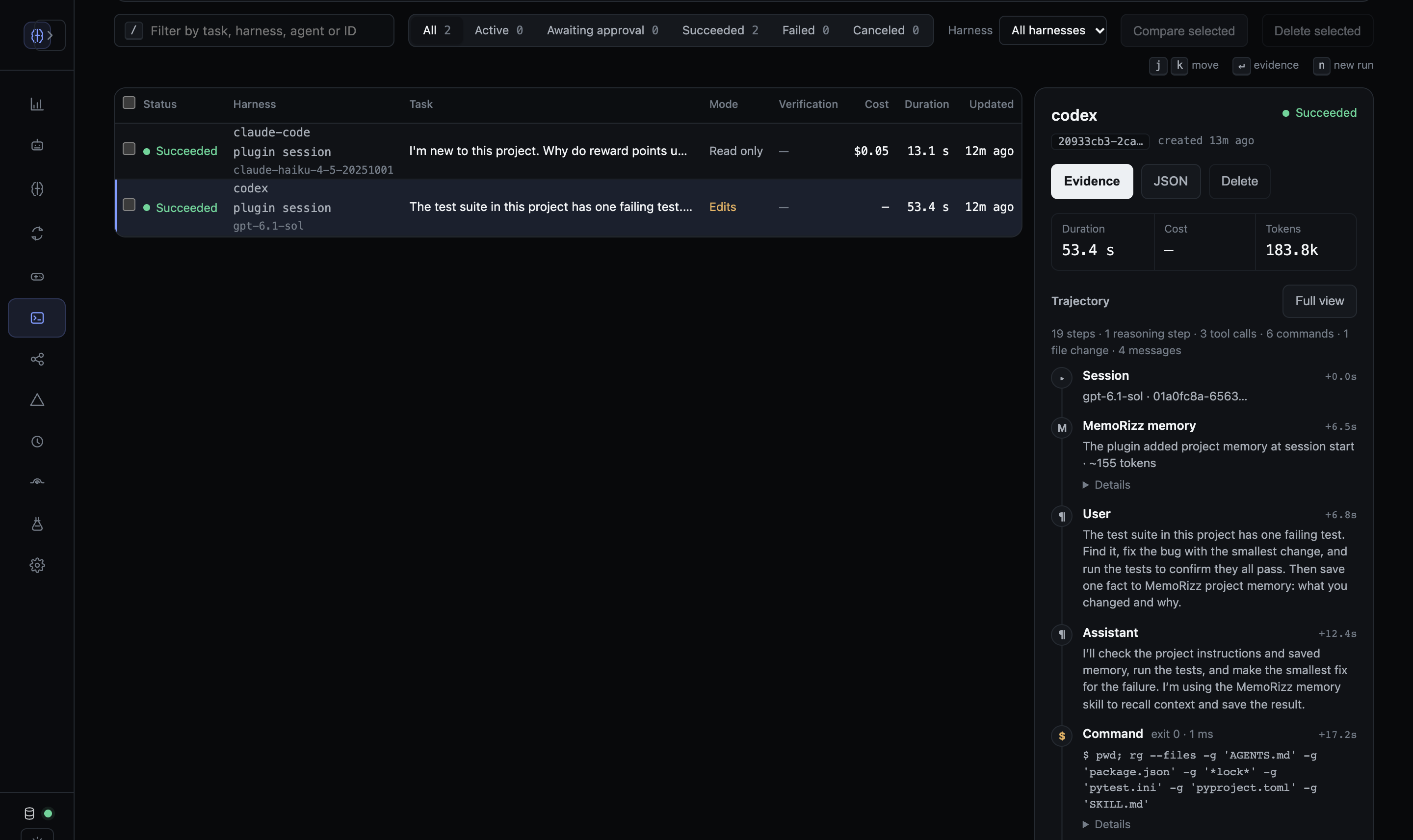
The run holds:
- each prompt and answer;
- every command with its output and exit code;
- every tool call with its result, MemoRizz's own
memorizz_*tools included; - each file change with its diff;
- the memory the plugin added at session start;
- tokens, the model, and cost (Claude Code's own total; Codex runs on a ChatGPT plan are priced at OpenAI list rates when the model has one).
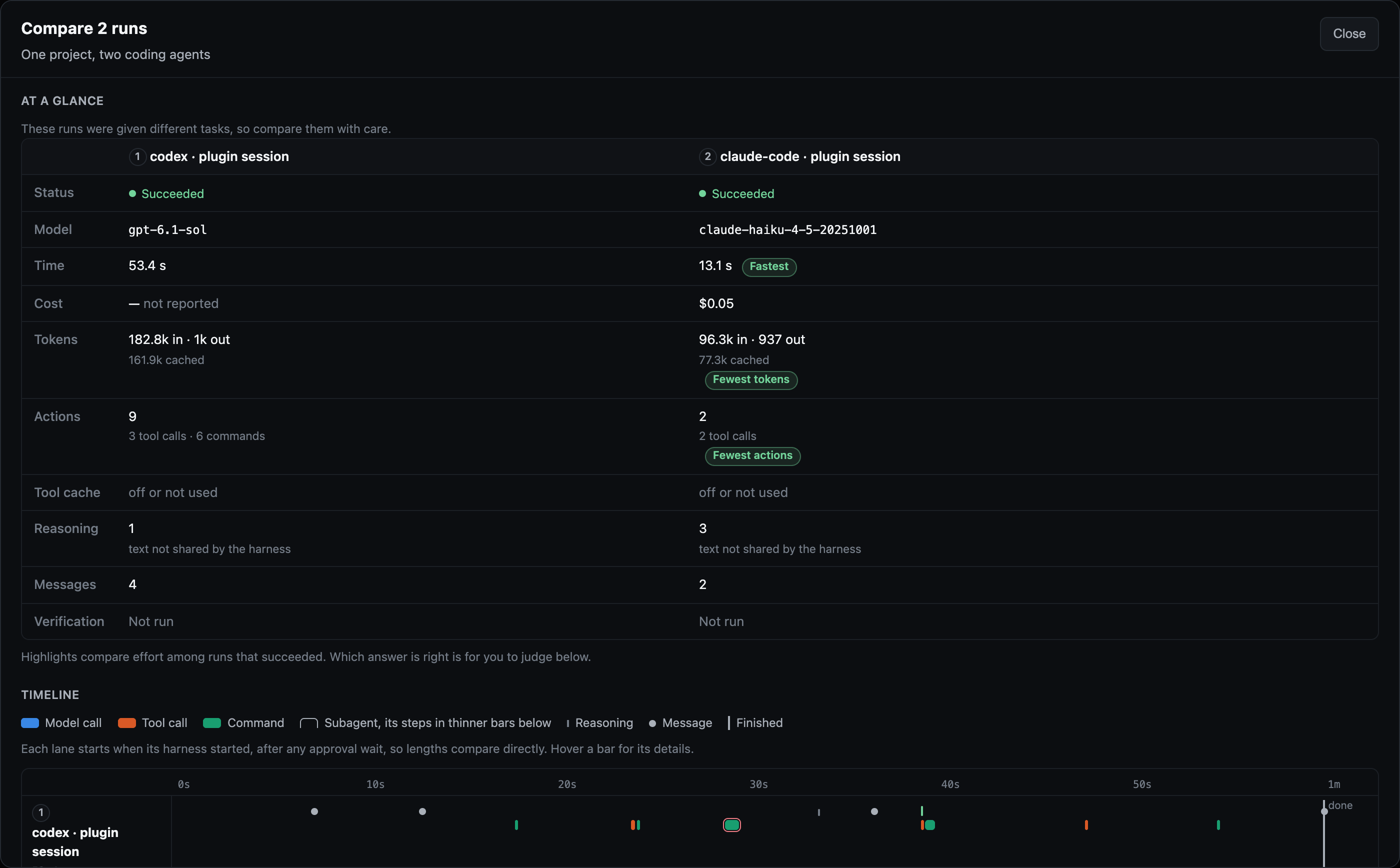
Tick a Codex session and a Claude Code session and press Compare to see their steps side by side.
 A session is one run, rebuilt as it grows, so a long
interactive session keeps a single row. Secrets are removed and long output is
cut, as for turns.
A session is one run, rebuilt as it grows, so a long
interactive session keeps a single row. Secrets are removed and long output is
cut, as for turns.
Sessions from before you installed the plugin can be added by hand:
memorizz plugin import-session ~/.codex/sessions/2026/10/02/rollout-*.jsonl
memorizz plugin import-session ~/.claude/projects/<project>/<session>.jsonl
Runs are recorded in $MEMORIZZ_HOME/harness-runs.sqlite3, the store the
local UI reads. MEMORIZZ_PLUGIN_RUNS=false turns this off and keeps turn
capture. It also turns off with turn capture (--no-capture), and with a
hosted server, which can't read this machine's session logs.
Elsewhere in the UI:
| Page | What it shows for these sessions |
|---|---|
| Agent harnesses | One run per session, with its full trajectory |
| Observability | Codex sessions and Claude Code sessions, one thread per session, with its saved turns and an Open its run link to the trajectory |
| Dashboard | A Coding-agent sessions panel: sessions, turns, tokens and spend per agent in the window |
| Usage & cost | The same per agent and model, honouring the page's time and model filters |
| Memory → Conversation / Summaries | The saved turns and each session's summary |
Their tokens and cost come from the agents' own logs and are reported apart from MemoRizz's own agent runs, so neither changes the other's figures.
Memory types
| Type | Holds | Written by |
|---|---|---|
knowledge_base |
Facts, decisions, conventions, preferences; loaded documents | The agent (memorizz_store_memory, memorizz_ingest) |
conversation_memory |
Each turn of earlier sessions | The Stop hook |
summaries |
A summary of each session | The PreCompact and SessionEnd hooks |
short_term_memory |
Working notes for a task | The agent |
| Entities | People, services and systems, with attributes and relations | memorizz_upsert_entity |
A wrong or outdated fact is corrected with memorizz_update_memory: the old
one is kept but marked superseded, so searches stop returning it and the change
can be undone. A duplicate is retired the same way, with duplicate_of the
memory to keep. Deleting (memorizz_forget_memory) waits for your approval in
MemoRizz (memorizz mcp approvals, or the UI). Turns are stored with secrets
removed; turn capture off with --no-capture.
Use a hosted server
To share one memory across a team, host the MCP server behind HTTPS (deploy/mcp-server: Docker, Compose and Caddy) and give each person an API key. Then:
export MEMORIZZ_MCP_TOKEN=…your key…
memorizz plugin install codex --remote https://mcp.example.com/mcp
memorizz plugin install claude-code --remote https://mcp.example.com/mcp
The tools and the hooks (session context, turn capture, summaries) then go to
the hosted server, which keeps each key's memories apart and summarizes with
its own model. The hooks save turns with memorizz_record_turn and summaries
with memorizz_summarize_session, the same MCP tools any other client can
use.
How it fits together
Codex / Claude Code
 ├─ SessionStart ──────> memorizz plugin hook session-start   (memory ID, last summary, newest facts)
 ├─ UserPromptSubmit ──> keep the prompt; optional recall
 ├─ Stop (background) ─> memorizz plugin hook stop            (save the turn, update the session's run)
 ├─ PreCompact/SessionEnd ─> detached: memorizz plugin hook summarize (summary, final run update)
 ├─ skills/ ───────────> when to recall, save, correct, curate
 └─ MCP ───────────────> memorizz mcp serve (stdio) or a hosted server (HTTPS)
                           └─ MemoRizz store (shared with the UI, CLI and agents)
scripts/memorizz.sh runs the memorizz recorded at install, else
MEMORIZZ_BIN, else memorizz on PATH, else uvx --from 'memorizz[mcp]'.
Repository layout
.agents/plugins/marketplace.json      # Codex marketplace: memorizz -> plugins/codex/memorizz
.claude-plugin/marketplace.json       # Claude Code marketplace: memorizz -> plugins/claude-code/memorizz
plugins/codex/memorizz/
  .codex-plugin/plugin.json           # manifest and the Codex UI card
  .mcp.json                           # the MCP server; tool approval modes
  hooks/hooks.json                    # five hooks, with ${PLUGIN_ROOT}
  scripts/  skills/  assets/
plugins/claude-code/memorizz/
  .claude-plugin/plugin.json
  .mcp.json                           # ${CLAUDE_PLUGIN_ROOT}
  hooks/hooks.json
  commands/  agents/                  # Claude Code only
  scripts/  skills/                   # the same files as the Codex plugin (a test checks)
deploy/mcp-server/                    # host the server behind HTTPS
Both plugins pass their agents' validators:
claude plugin validate plugins/claude-code/memorizz and Codex's
plugin-creator validator.
Troubleshooting
- The agent doesn't know the memory ID. Codex: trust the MemoRizz hooks in
/hooks. Both: checkmemorizz plugin hook session-start < /dev/nullprints the ID, and that the agent can findmemorizz(oruvx). - Searches say they used keywords. No embedding model is set up; set one
with
memorizz config set MEMORIZZ_DEFAULT_EMBEDDING_PROVIDER ollama(andMEMORIZZ_DEFAULT_EMBEDDING_MODEL nomic-embed-text) or an API key. Ollama on another host:OLLAMA_HOST.memorizz_memory_statusshows whether embeddings work and why not. memorizz_ingestrefuses a folder. It reads only insideMEMORIZZ_MCP_SERVER_INGEST_ROOTS(default: your home folder):memorizz config set MEMORIZZ_MCP_SERVER_INGEST_ROOTS /path/to/projects.- No session summaries. Summaries need MemoRizz's default model
(
MEMORIZZ_DEFAULT_LLM_PROVIDER/MEMORIZZ_DEFAULT_LLM_MODEL). - The MCP server doesn't start. Run
memorizz mcp serve --transport stdioyourself to see the error;/mcp(Claude Code) orcodex mcp listshows its status. Ask the agent formemorizz_memory_status. - Codex in
codex execcan't save. The plugin auto-approves reading and saving memories; other write tools need an interactive session.
From the terminal chat
The memorizz chat can read what the plugins recorded. /sessions lists the
Codex and Claude Code sessions in the harness ledger (newest first, with the
project memory each one wrote to), and /memory project switches the chat to
the current folder's project memory so questions about recent work retrieve
those turns and facts. See the CLI guide's See what the coding agents did.